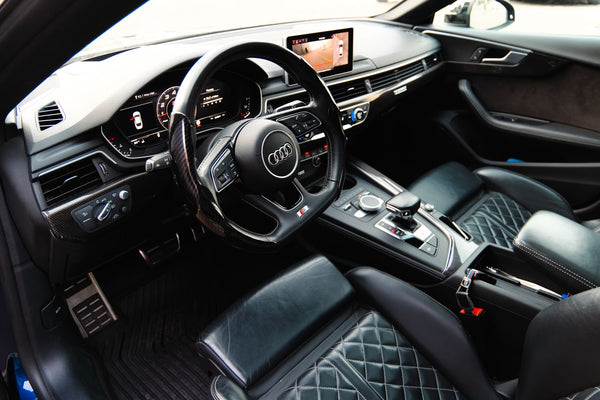
A steering wheel listed as compatible with a given model can cover several versions of that model. Manufacturers update their cars throughout a generation, sometimes with a visible facelift, sometimes with more discreet changes in the equipment. That is why the “phase 1” or “phase 2” label is worth checking before choosing the base for your custom steering wheel.
What do phase 1 and phase 2 mean?
Phase 1 commonly refers to the first version of a generation. Phase 2 is its facelifted version. The model name may stay the same through this change. A change in the bumper or lighting is easy to see, while the shape of the steering wheel controls is mainly noticeable from inside the cabin. The exact dates of the transition from one phase to another vary depending on the brand, model, and market.
A new phase is not always a new generation. It is a useful distinction when you read a product page. Start by determining the generation of the car, then check whether the fitted steering wheel belongs to an earlier or facelifted version. The general compatibility guide explains this first step.
The terms "phase 1" and "phase 2" are used for reference, but they do not replace the description of the part. Two listings may use these terms for slightly different periods. On a steering wheel product page, also look for generation codes, the indicated years, and photos of the controls. These clues provide a more precise basis for discussion.
What can change on the steering wheel after a facelift?
The design of the spokes and the shape of the center section can change. The multifunction buttons can be arranged differently or offer additional controls. Some vehicles also add or modify the shift paddles, heating, or sensors related to the original equipment. These differences cannot be deduced from the bodywork alone: you need to look at the steering wheel actually fitted.
A front-facing photo shows the general shape and visible controls. Add a close-up of the buttons and, if fitted, the shift paddles. This documentation helps prepare for the configuration check. Our article on multifunction buttons details the information to note.
Also pay attention to equipment that is not immediately visible from the front. The heated steering wheel, for example, is a function that should be explicitly mentioned. Its presence on some vehicles in a range does not mean your particular car has it. A photo of the controls and the list of the car's options complement the visual observation.
Why can the year of first registration be misleading?
The date of first registration indicates when the vehicle was registered for the first time. It does not by itself describe the production date, the phase, or the exact list of its equipment. A car produced before a facelift may be registered later. Conversely, a year stated on a product page may include the start of the facelifted version.
Use the year as one clue among others. The generation code and the VIN provide more precise reference points, to be compared with the steering wheel you have in front of you. The guide on the VIN and steering wheel compatibility explains what it can confirm and why photos remain important.
Confusion often arises around a facelift changeover. A listing mentions a starting year, your car shows the same year on its papers, and yet the photos show a different steering wheel design. In this situation, do not force the match. Ask for the production date, check the generation code, and provide a photo of the steering wheel. Taken together, these details clear up the ambiguity.
What should you gather before choosing a base?
- The exact model and its generation code, if you know it.
- The year of manufacture or the VIN, when this information is available.
- A clear photo of the steering wheel from the front, with its spokes and center visible.
- Photos of the buttons, shift paddles and other functions present.
Also note any previous modification of the steering wheel. A used car may have been fitted with a steering wheel that differs from its factory configuration. In this case, the photos of the current steering wheel and the original data should be considered together. Our comparison original configuration or retrofit helps to understand this distinction.
A short set of details is usually enough to make the request clear: the model name, its year of production if you know it, the VIN, and a few clear photos. Avoid using catalog images as the only evidence. They show the presentation of a version, whereas the verification concerns the specific car on which the steering wheel will be mounted. The details of the controls visible in your photo have real value here.
How do you decide between two families that both seem compatible?
Compare the photos on the product page with the shape of the fitted steering wheel, then check the controls and functions to keep. If two families seem similar, prepare the information above before confirming your choice. A manual check of the configuration confirms the right base for the project. It takes into account the car and its actual equipment, not just the model name.
Once the family is confirmed, choose the materials and finishes. Apex Studio then builds the steering wheel to order. The original airbag module remains the reference point for the standard configuration. To prepare your project, browse the Apex Studio steering wheels and provide your vehicle details during configuration.
This method keeps a facelift from becoming an automatic verdict. Some changes are visual, others also concern the steering wheel equipment. The real question is which functions and which base suit your particular car. Once that is confirmed, you can move on to materials and finishes without confusing looks with compatibility.