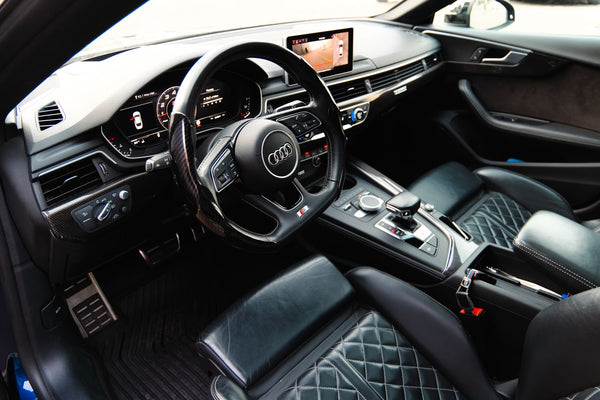
F20, G80, 8V, 8Y, W205 or C8: generation codes help distinguish cars that sometimes share the same model name for many years. They are useful for finding a steering wheel family, but they do not always appear clearly on vehicle documents. The right method is to gather several clues and cross-check them.
What is an automotive generation code?
A generation code is a designation used by a manufacturer, its network, or parts catalogs to identify a technical family. It complements the model name. A BMW M3 can thus belong to the F80, G80, or G81 generation. An Audi A3 can be associated with the codes 8P, 8V, or 8Y depending on its period and body type.
This code helps to reduce ambiguity, but it does not describe the entire configuration. Two cars of the same generation can have different steering wheels depending on the trim, the model year, the buttons, the shift paddles, the heating, or the driving aids. So the code starts the check, it does not finish it.
Does the code appear on the registration certificate?
The registration certificate contains identifying information such as the make, model, variant, version and VIN. The generation code used in automotive guides does not necessarily appear there in the form you are looking for. So do not conclude that your vehicle has no such code simply because you do not see F30, 8V, or W177 on the document.
Use the certificate to note the VIN, the date of first registration, and the type or version fields. These elements provide starting points. They must then be compared with a manufacturer source or a parts catalog for the vehicle's market.
Where should you look for the generation code?
- Manufacturer documentation: the manual, the digital logbook, the customer area, or the brand's announcements may name the technical family.
- Dealer network: a workshop or parts department can find the designation from the VIN.
- Parts catalog: a search by VIN can often link the vehicle to a specific series or platform.
- Labels and plates: some vehicles display references on the door frame, engine compartment, or trunk. They are not always the generation code, but they can help with cross-checking.
- Vehicle history: a maintenance invoice or an original order may mention the type, series, or installed options.
Favor a source directly linked to the manufacturer or the vehicle. A listing, a forum or a photo found online may provide a lead, but not sufficient confirmation to order a part.
How do you use the VIN without confusing it with the generation code?
The VIN is the vehicle's unique identifier. It has 17 characters on most modern cars. The generation code, on the other hand, refers to a family shared by many vehicles. So the two pieces of information serve different purposes.
Note the VIN on the vehicle and on its documents, then check that they match. A tool or a contact with a manufacturer catalog can use this number to find the model, production period, and some original equipment. Our article on the VIN and steering wheel compatibility explains this role in more detail.
Why is the year alone not enough?
A calendar year can include the end of one generation and the beginning of the next. A facelift can also change the steering wheel, buttons, or equipment before the model name changes. Finally, the first registration date may be later than the vehicle's production.
If your car is near a generation change, note the production date when available and compare the installed steering wheel. The guide phase 1, phase 2 and facelift shows why this boundary deserves an additional check.
Which photos should you prepare to identify the steering wheel family?
Take a front photo of the steering wheel, with the wheels straight and good lighting. Add close-ups of the center module, buttons, shift paddles and heating controls. If your car has hands-on detection or driving aids linked to the steering wheel, mention them too.
Photos make it possible to spot a difference that the model name does not show. An airbag module shape, a button layout, or a type of paddle can point the check toward another family. Avoid images taken only from the side or with the wheel hidden by a cover.
Does the generation code guarantee the compatibility of a steering wheel?
No. The generation code narrows the search, but it guarantees neither the shape of the center module, nor the connectors, nor the functions present. Compatibility must be confirmed with the vehicle configuration and the components planned for the project.
At Apex Studio, the aesthetic choice comes after this step. The materials, stitching and rim shape can be configured once the right family is identified. The brand and generation compatibility guide gathers the information to prepare.
What checklist should you send before choosing a steering wheel?
- exact make and model;
- presumed generation code;
- model year and date of first registration;
- full VIN, sent through an appropriate channel;
- front photo of the current steering wheel;
- photos of the buttons, paddles and center module;
- presence of heating or hands-on detection;
- original configuration or retrofit project.
This checklist keeps you from choosing based on a similar-looking wheel or a single year. It also provides a clear framework if two generations overlap. Once everything is gathered, you can open the configurator of the corresponding collection and define the materials of your custom steering wheel.